دانلود نرم افزار Ashampoo Video Optimizer Pro
Ashampoo Video Optimizer Pro نرم افزاری برای بهبود کیفیت فایل های ویدئویی می باشد که به عنوان یک ویرایشگر قدرتمند
فیلم، به صورت کاملا خودکار و با پشتیبانی از امکان پردازش دسته ای، بهترین نتایج را به شما ارائه می دهد. انبوه تنظیمات و ابزار های ویرایشی در برنامه های مشابه دیگر باعث سردرگمی بیشتر کاربر می شود. حال اینکه این نرم افزار در کنار یک رابط کاربری حرفه ای و مناسب، نه تنها کیفیت فیلم های شما را افزایش می دهد، بلکه ابزار های ویرایشی مختلفی را نیز در اختیار شما قرار می دهد تا بتوانید نور، رنگ و کنتراست فیلم های خود را تنظیم کنید، آن ها را برش داده، بچرخانید، بخش دلخواهی از فیلم را انتخاب کرده و استخراج کنید یا چندین
عکس و فیلم را با هم در یک کلیپ ادغام کنید، ویدئو های تایم لپس و اسلوموشن بسازید و ده ها قابلیت دیگر که می توانید بر روی ویدئو های خود اعمال کرده و نتایج با کیفیت و حرفه ای دریافت کنید.
قابلیتهای کلیدی نرم افزار Ashampoo Video Optimizer Pro:
- بهینه سازی رنگ ها و کنتراست ها
- افزودن سردی یا گرمی به صحنه های خود
- امکان استفاده از تنظیمات پریست ارائه شده
- بهبود کیفیت فیلم های بی کیفیت و تار ضبط شده با موبایل یا دوربین
- حذف نویز های اضافی
- برش، چرخش و تغییر اندازه فیلم
- ایجاد ویدئو های اسلوموشن و تایم لپس
- برطرف کردن مشکل اعوجاج لنز
- اضافه کردن متن و افکت
- پشتیبانی از فرمت های مختلف
- پشتیبانی از رزولوشن های مختلف از جمله HD ، 2K ، 2.7K و 4K
- امکان ویرایش متادیتا و انکدینگ سریع
- و ...
دانلود Ashampoo Video Optimizer Pro v2.0.1 x64 - نرم افزار بهبود کیفیت فیلم
| 💿 نام نرم افزار | Ashampoo Video Optimizer Pro |
| 📌 شماره نسخه | v2.0.1 |
| 📁 دسته بندی | ضبط و ویرایش ویدئو |
| 💾 حجم فایل | 104.9 مگابایت |
| 📅 تاریخ به روزرسانی | 1399/7/9 |
| 📊 تعداد دانلود | 3,613 |
| ❤️ هزینه دانلود | رایگان و نیم بها |
| 💡 آموزش نصب و فعال سازی | ✔️ |
سوالات متداول
نرم افزار Ashampoo Video Optimizer Pro چیست؟
نرم افزار ویرایش و بالا بردن کیفیت فیلم
آخرین ورژن نرم افزار Ashampoo Video Optimizer Pro را از کجا دانلود کنم؟
برای دانلود نرم افزار Ashampoo Video Optimizer Pro به طور رایگان و با ترافیک نیم بها (در ایران) روی این لینک کلیک کنید.
آموزش نصب نرم افزار Ashampoo Video Optimizer Pro چگونه است؟
راهنمای نصب نرم افزار Ashampoo Video Optimizer Pro در این صفحه درج شده است.
کلمات کلیدی Ashampoo Video Optimizer Pro: Video editor, Edit video, Video filter, Filter, Overlay, Template, Effect, Ashampoo GmbH & Co. KG, نرم افزار افکت گذاری روی فیلم, اضافه کردن فیلتر های ویدئویی, اضافه کردن فیلتر به فیلم, ویدئو ادیتور, ویرایش فیلم, بهبود کیفیت فیلم, بالا بردن کیفیت فیلم, ارتقا کیفیت فیلم, نرم افزار ویرایش فیلم, دانلود نرم افزار ویرایشگر فیلم, دانلود نرم افزار تدوین فیلم, دانلود نرم افزار ویرایش حرفه ای فیلم, دانلود نرم افزار حرفه ای میکس فیلم, ادیت فیلم, ویرایش فیلم, نرم افزار ویرایش فیلم کم حجم, نرم افزار ادیت فیلم حرفه ای, دانلود نرم افزار ویرایش فیلم حرفه ای با حجم کم, نرم افزار ادیت فیلم حرفه ای, نرم افزار ویرایش و بهبود کیفیت فایل های ویدئویی,
Ashampoo GmbH & Co. KG full software collection,
شساشپحخخ لپذا & زخ. نل, شساشئحخخ لئذا & زخ. نل,دانلود Ashampoo Video Optimizer Pro نرم افزار بهبود کیفیت فیلم,
How to crack Ashampoo Video Optimizer Pro,
طریقه/روش/راهنمای کرک,
Torrent/Usnet/Buy,
Setup,
Install,
دانلود رایگان نرم افزار,
P30Download,
Danlod/Danload/Donload,
nhkg,n kvl htchv,
Download Ashampoo Video Optimizer Pro Software,
for windows,
Trial,
last Version/Edition,
New Version,
Update,
Free Full Licensed,
Repacked,
Direct Download Link (DDL),
Crack,
Get Ashampoo Video Optimizer Pro,
Keygen,
Patch,
Serial,
Portable,
برنامه Ashampoo Video Optimizer Pro 2.0.1,
Enhance, cut and stabilize videos with ease,
شساشپحخخ رهیثخ خحفهپهظثق حقخ, شساشئحخخ رهیثخ خحفهئهظثق حقخ,خرید Ashampoo Video Optimizer Pro,
به روز ترین ورژن,
آخرین ورژن,
آخرین نسخه,
جدیدترین ورژن,
جدیدترین نسخه,
2.0.1,
داونلود/دانلد/تورنت
نرم افزار ویرایش و بالا بردن کیفیت فیلم,
تحميل,
دریافت,
دانلود آشامپو ویدئو اپتیمایزر پرو v2.0.1 x64 - نرم افزار بهبود کیفیت فیلم,
پی سی,
پی 30,
سافت ور,
تریال,
سوفت ور,
مجانی,
2020-10-04
10:11:03
Ashampoo Video Optimizer Pro 2.0.1 Download
Video editing can be a frustrating experience with loads of fidgety fine tuning–unless you're using Ashampoo® Video Optimizer Pro! This powerful movie editor brings out the best in your shots, fully automatically and with batch-processing support!
Stabilize shaky videos, optimize colors and contrasts, and sharpen your footage at the click of a button. Digital noise caused by unfavorable lighting or the dreaded flickering are also easily fixed. Create stunning videos with slowmo or time-lapse effects and say goodbye to lens distortions, Add texts and images to add subtext to individual scenes and add additional polish to your videos with 20 presets that combine filters, effects and color settings. The well laid out video editor section lets you cut, rotate and merge individual clips with incredible ease, no previous knowledge required!
Quick fix or extensive edits–two worlds combined in Video Optimizer
Ashampoo® Video Optimizer Pro 2 is as multi-faceted as the needs of its users. Quick Mode is perfect to fix any number of videos quickly. Stabilize, sharpen, and denoise your shots in just a few clicks. Use the numerous other functions and effects to instantly enhance the quality of your videos with smart auto-features! Extended Mode is your creative playground and home for perfectionists with a need for maximum control and manual fine-tuning. With large previews and ample customization options, this mode offers the perfect environment to cut your footage into separate sections and optimize and adjust each of them individually. You can also easily exclude sections from exports to remove entire scenes from your movie.
20 brilliant presets for stunning color patterns
Our presets include more than just color filters. Our team has created extensive profiles that include lighting, color tones, saturation, vignettes, and much more. What would usually take you hours of manual tuning to find the perfect balance is now just one click away. From cold and unfeeling Scandinavian vibes to warm shades of red, you won't believe how quickly you can change the entire mood in your videos! Naturally, you can also create your own presets and reuse them in other projects.
Enhance colors and contrasts and make your videos shine
Ashampoo® Video Optimizer Pro 2 can enhance your videos by optimizing colors and contrasts. Your videos will feel more energetic and realistic after just a few clicks. You can adjust white balance settings to add coldness or warmth to your scenes, which is especially useful with digital cameras that tend to produce rather cold visuals. Of course, you can always make manual adjustments until you're fully satisfied with the results. This works wonders for old footage, too. Selective editing of brightness, hue, shadows and highlights then provides the final finish for the perfect image. With Ashampoo® Video Optimizer Pro 2, there are no more mediocre shots!
Stabilize shaky footage automatically
Clips taken with cellphones, DSLRs, or action cams (GoPro) tend to be shaky, ruining otherwise great moments. How about fixing this all to common annoyance right at home? Ashampoo® Video Optimizer Pro 2 offers powerful video stabilization for your shaky footage! Even handheld shots taken in motion will become smoother and more realistic. Enhance your clips and say goodbye to wobbly videos!
Denoise and deflicker your videos
The darker the footage, the more prevalent the dreaded digital noise. Unfavorable lighting then often adds nasty flickering to the mix. Poor lighting furthermore contributes to blurriness by making it harder for your lens to focus. Ashampoo® Video Optimizer Pro 2 auto-detects these issues. Your footage is then sharpened and stabilized, turning dark and blurry shots into passable videos.
Cut, rotate and resize your videos
Ashampoo® Video Optimizer Pro 2 not only enhances the quality of your videos but also supports cutting, rotating and cropping your shots. The new details view allows for even more precise adjustments. Select any number of sections and export highlights only or merge multiple photos and videos together into a single clip! Rotate and flip your videos at fixed intervals or freely and do away with crooked image horizons! Focus on individual image portions or resize the entire image as needed!
Work with slowmo and time-lapse effects
Change the speed of entire videos or individual sections with slowmo and time-lapse effects. Slowmo is great to accentuate details and the magic of the moment. Time-lapse works best to speed up less significant portions or showcase lengthy developments without the need for cuts. We highly recommend you try out these effects with the built-in tilt-shift effect. It's truly magical! Ashampoo® Video Optimizer Pro 2 makes working with these effects a breeze and adds an entirely new dynamic to your videos!
No more fisheye and lens distortions
Many cameras provide anything but realistic images, in some cases by design. Action cams in particular often come with wide-angle lenses to capture all of the action. While great at first, the viewing experience can quickly suffer, especially on larger screens! Ashampoo® Video Optimizer Pro 2 fixes these lens distortions for a more harmonious and natural image. The program comes with multiple camera profiles geared towards the most popular camera models. You can even quickly create your own in case your model isn't supported by default.
Add texts and effects
Custom text and effects add more individual flair to your videos. Ashampoo® Video Optimizer Pro 2 makes it particularly easy to add texts and external images to your scenes, from comments and explanations to funny cliparts and stickers. Color filters help set the mood and the tilt-shift feature selectively softens individual image portions to turn objects into miniatures. For a more pleasant touch, you can even round the corners of your video in just a few clicks or with the help of handy sliders!
Numerous formats, metadata editor and super-fast encoding
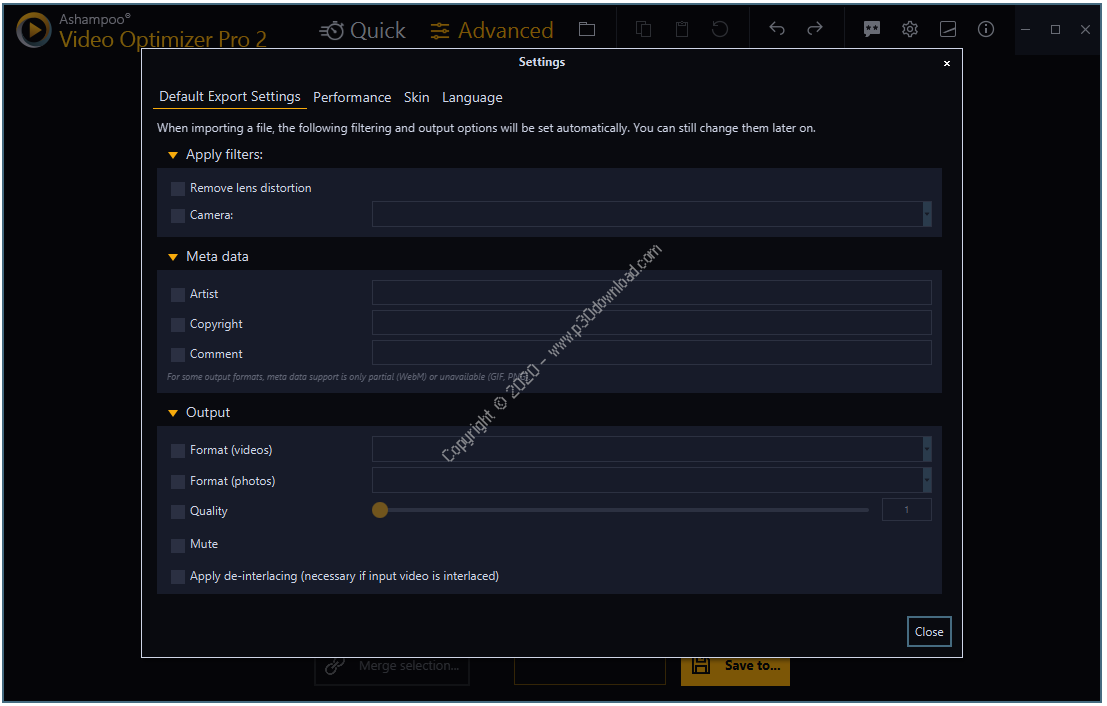
Ashampoo® Video Optimizer Pro 2 comes with a metadata editor to add details like author, copyright and title to your videos. The program supports all popular formats and codecs in all resolutions (including HD, 2K, 2.7K, and 4K) and also processes H.265, as used by GoPro cameras! To save you time and effort, all of these features are also supported in batch processing mode. Enhance and edit multiple videos, fill in missing metadata, or apply any of the numerous effects in a single click! Ashampoo® Video Optimizer Pro 2 has been speed-optimized and uses full H.264-based hardware acceleration on NVIDIA cards for an extra boost to help you edit your videos in record time.
More quality multimedia from Ashampoo
Capture what you see on your screen as images or videos. Ashampoo® Snap 11 makes it possible! Augment your captures with illustrations and comments, create GIFs and share the results. If audio is more on your side, get Ashampoo® Music Studio 7 and organize, mix and convert your songs to your heart's content. Turn your music CDs into digital files and benefit from automatic track naming and online cover searches! Automatic photo optimization is at the core of Ashampoo® Photo Optimizer 7—and it gets the job done like no other program can! Batch-process entire collections and add new shine and vibrancy to your images. And when you're done, import them into Ashampoo® Slideshow Studio HD 4 to create captivating slideshows with background music, visual effects and smooth transitions. Bring your images to life and turn your precious memories into professional videos!
More info ( ↓ open / close ↑ )